
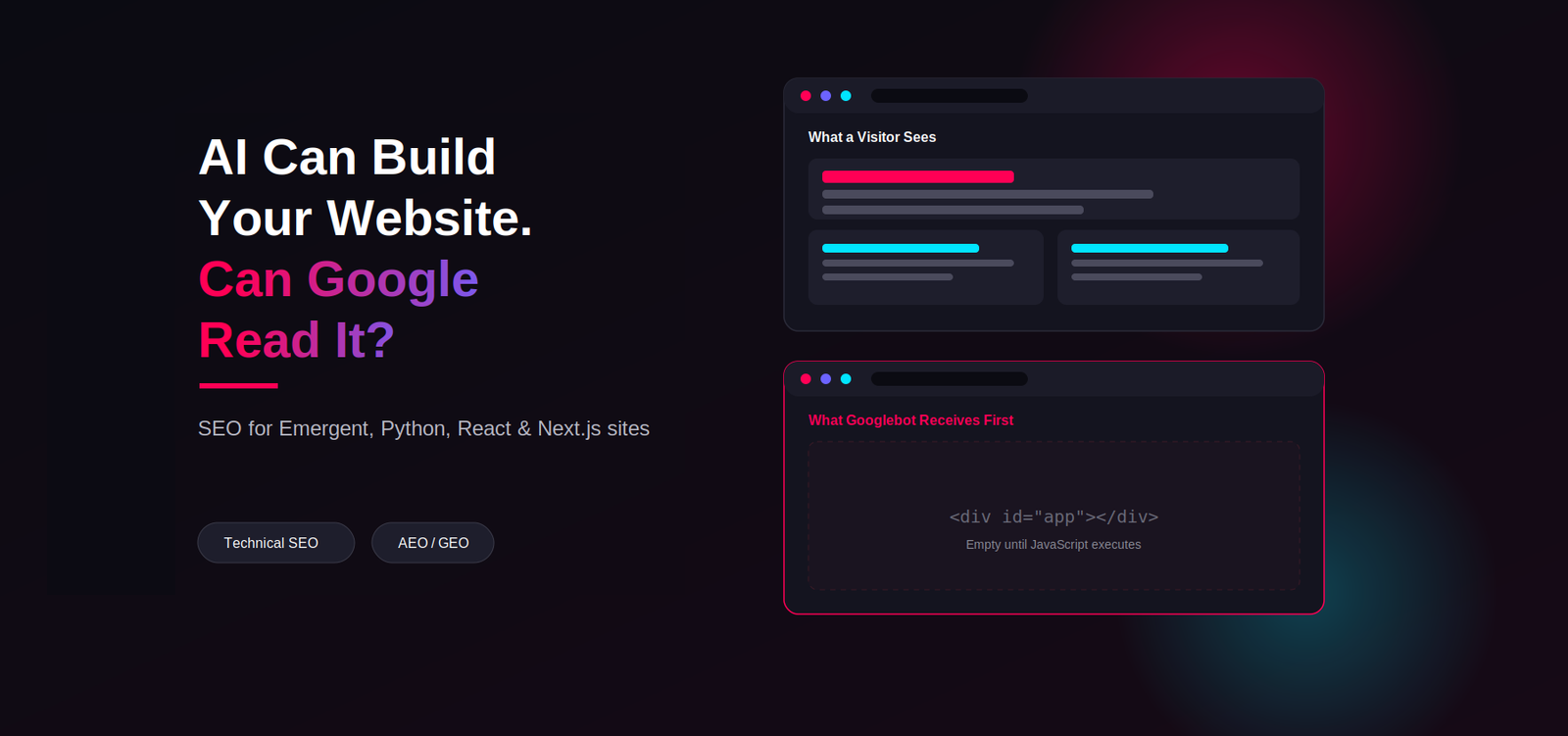
AI page builders like Emergent, plus custom Python, React or Next.js apps, can ship a working site in hours — but that speed says nothing about whether Google and AI search engines can actually crawl, render, index and trust it. Ranking an AI-built site takes deliberate work most of these frameworks don't handle by default: proper rendering, crawlable links, and structured data.
Platforms such as Emergent and other AI-powered development tools have changed how websites and web applications are created. A business can describe what it wants, generate a functional application, connect databases and APIs, and launch a polished website without following the traditional development process. That is a major advantage.
But there is an important distinction between building a website and building a website that is search-engine friendly. An AI development platform can generate technically functional code without necessarily creating the SEO architecture your website needs. The same applies to websites built with Python, React, Next.js or other JavaScript frameworks.
The technology itself is not the SEO problem. The implementation is. Richi Meckvan
A properly architected Python, React, Next.js or AI-generated website can perform extremely well in organic search. The problem occurs when SEO requirements are treated as an afterthought instead of being considered during development. This guide explains how to audit and optimize AI-built websites without automatically rebuilding the entire website.
Why AI-Built Websites Need an SEO Architecture
Traditional website development often involves separate conversations between designers, developers, content teams and SEO professionals. With AI development platforms, much of this process can happen through prompts. That makes development faster, but it also makes it easier to accidentally skip important SEO decisions.
For example, an AI-generated application may create beautiful page layouts, dynamic routes, JavaScript-driven navigation, API-powered content, automatically generated components, database-driven pages, client-side rendering, generic metadata, dynamic URLs, and automatically generated content. Everything may work perfectly for a human visitor. But SEO requires answering a different set of questions:
- Can Google discover the page?
- Can Google render the page?
- Can Google see the important content?
- Does the page return the correct HTTP status?
- Is the URL indexable?
- Does the page have a unique title?
- Is the canonical URL correct?
- Can search engines discover the page through internal links?
- Is the page included in the sitemap?
- Does structured data accurately describe the page?
- Can AI-powered search systems understand what the business, product or service represents?
These are SEO architecture questions, not simply development questions.
Are Emergent and AI-Built Websites SEO-Friendly?
The short answer: they can be. There is no rule that says a website created using Emergent, Python, React, Next.js or another AI development platform cannot rank in Google. Google has continued to improve its ability to process JavaScript, and its current documentation makes clear that Google Search has been rendering JavaScript for years.
The misconception is that "if a website uses JavaScript, Google cannot rank it." That is too simplistic. The real question is how the JavaScript application is implemented. Consider two websites, both built in React:
| Attribute | Website A | Website B |
|---|---|---|
| Rendering | Server-rendered | Assembled entirely client-side |
| Content availability | Present in initial HTML | Loaded only after API calls |
| URLs | Clean, crawlable | Dynamic, technical parameters |
| Metadata | Unique per page | Generic <title> site-wide |
| Canonicals | Correct | Incorrectly implemented |
| Sitemap | Present and accurate | Missing |
| Structured data | Implemented | Absent |
| Internal linking | Strong | Poor, with soft 404 pages |
| Performance | Fast | Heavy JavaScript bundles |
Both use React. Only one has been deliberately architected for search. Framework choice does not determine SEO performance. Implementation does.
How Google Crawls and Renders Modern Websites
A simplified version of the process looks like this: URL discovery, crawling, rendering, indexing, and ranking. The important point for modern JavaScript websites is that crawling and rendering are not exactly the same thing. A crawler may initially retrieve HTML and resources, while JavaScript rendering happens as a separate part of Google's processing pipeline.
This means you should not simply ask "does Google execute JavaScript?" Instead ask: "what does Google ultimately receive and understand after the page has been processed?" For important SEO pages, your goal should be to make the important content, links, metadata and structured information reliably available, ideally without depending entirely on that second rendering pass.
14 Common SEO Problems With AI-Built Websites
AI-built websites can develop many of the same problems as traditionally developed JavaScript applications. Here are the most common ones I would investigate during a technical SEO audit.
1. Client-Side Rendering Without an SEO Strategy
With client-side rendering (CSR), the browser initially receives a relatively minimal HTML document and JavaScript builds much of the page. That can work well for applications, but informational and commercial SEO pages need more than application functionality. You need to verify what exists in the initial HTML, what appears after rendering, and whether headings, primary content, internal links, metadata and structured data are all present. Google supports JavaScript, but that does not mean every implementation is equally reliable or efficient.
2. Important Content Exists Only After JavaScript Execution
Imagine a service page where the initial HTML contains only an empty container:
The browser then loads JavaScript and requests content from an API. The visitor eventually sees a fully formed page: SEO Consultant in Ahmedabad, Technical SEO, Local SEO, E-commerce SEO, Contact our consultant. The visual result may be excellent, but your audit should verify what Googlebot receives and renders, not simply what you see in Chrome.
3. Missing or Incorrect Robots.txt
A surprisingly simple robots.txt mistake can prevent crawlers from accessing important resources. For example:
If /services/ contains your primary commercial pages, you have created an obvious SEO problem. Robots.txt controls crawler access and should be reviewed carefully rather than automatically generated and forgotten. Google's documentation also notes an important distinction: a URL disallowed from crawling may still potentially appear in search results even though Google cannot crawl its content.
4. Missing XML Sitemap
AI-generated websites sometimes launch without a proper XML sitemap. For a small static website this might not immediately cause a disaster. For a large application with dynamically generated URLs, it can become a significant discovery problem. A sitemap should generally contain only URLs you actually want indexed. Avoid filling it with redirecting URLs, 404 URLs, duplicate URLs, noindex URLs, parameter variations, or non-canonical URLs.
5. Duplicate Page Titles
A common AI-generated implementation might produce "Home | Company Name" repeated across multiple routes. Instead, each important page should have a title aligned with its actual purpose, for example "SEO Consultant in Ahmedabad | Company Name" or "Technical SEO Services | Company Name."
6. Generic Meta Descriptions
AI development tools may generate a single default meta description across an entire application. That wastes an opportunity to communicate page relevance. Your important pages should have page-specific metadata.
7. Dynamic URLs With Technical Parameters
A website might generate a URL such as /product?id=4837 instead of /products/seo-audit-tool. Dynamic URLs are not automatically bad, but if technically generated URLs create duplicate pages, multiple URL versions, crawl traps, unclear hierarchy or poor user experience, they need to be controlled.
8. Incorrect Canonical Tags
Canonicalization becomes especially important when applications generate multiple URLs for similar content. Google describes canonicalization as the process of selecting the representative URL from duplicate or substantially similar pages. Importantly, a canonical declaration is a hint, not an absolute command.
This should point to the preferred version of the page. Do not automatically canonicalize every URL to the homepage; that is not a substitute for proper URL architecture.
9. Soft 404 Pages
One common JavaScript application problem is returning HTTP 200 for a page that effectively does not exist. A URL like /services/this-page-does-not-exist might display "Sorry, this page could not be found" while still returning HTTP 200. That creates a soft 404 situation. A genuinely unavailable page should generally return an appropriate HTTP status, such as 404 Not Found.
10. Orphan Pages
An orphan page exists but has no meaningful internal links pointing to it. It may be in your database, in your sitemap, and technically valid, but difficult to discover through the site's architecture. A sitemap can help discovery, but it should not replace a logical internal linking system.
11. Missing Structured Data
AI-built websites often focus on visual components while overlooking structured data. Depending on the website, useful schema types may include Organization, LocalBusiness, Product, Service, Article, BreadcrumbList, and FAQPage where appropriate. Structured data should describe what is genuinely present on the page. Never add schema simply because you want a particular rich result.
12. Heavy JavaScript
AI-generated applications can include unnecessary libraries, dependencies, components, client-side scripts, third-party integrations and animation frameworks. The result can be a website that looks impressive but loads excessive JavaScript, which can affect performance and user experience.
13. Weak Internal Linking
AI-generated pages are often created individually, which can result in a site where the homepage, service pages and blog posts exist independently rather than forming a connected topical structure. A stronger architecture groups services and supporting content into clear hierarchies, for example an SEO Services hub linking down to Technical SEO, Local SEO, E-commerce SEO and International SEO, alongside an SEO Blog organized the same way.
14. Poor Mobile Implementation
A responsive CSS framework does not automatically guarantee good mobile SEO. Check content parity, navigation, tap targets, font sizes, layout shifts, image behavior, mobile rendering, forms and Core Web Vitals. Google primarily uses the mobile version of a site's content for indexing, so mobile should not be treated as a secondary experience.
JavaScript SEO: CSR vs SSR vs SSG
One of the most important technical decisions for modern websites is how pages are rendered.
| Rendering Method | How It Works | SEO Consideration |
|---|---|---|
| CSR | Browser builds the page using JavaScript | Requires careful rendering and content validation |
| SSR | Server generates HTML for each request | Strong option for dynamic SEO pages |
| SSG | Pages generated ahead of time | Excellent for stable content |
| Pre-rendering | HTML generated before delivery | Useful where appropriate |
| Hybrid | Different strategies for different pages | Often ideal for complex applications |
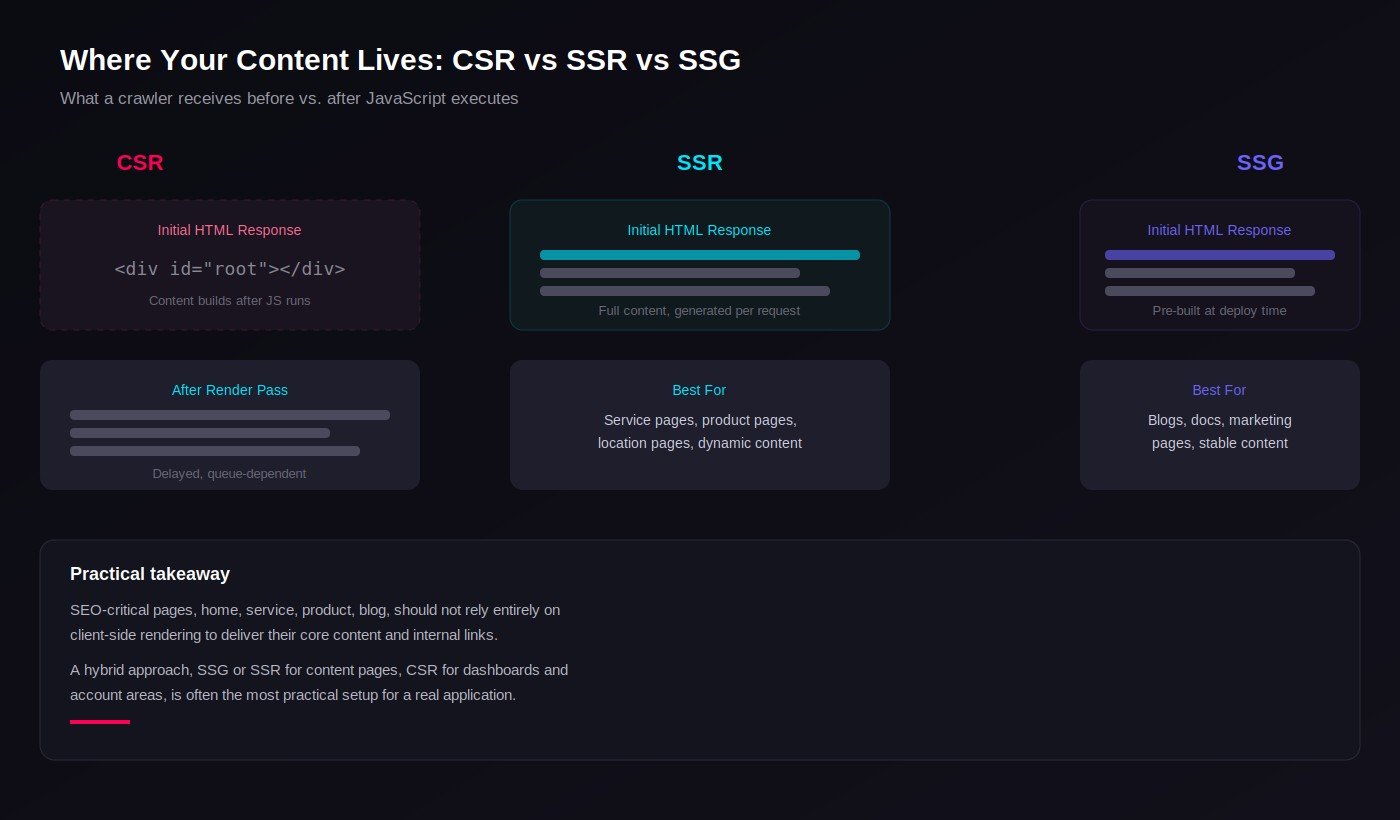
Client-side rendering is useful for highly interactive applications, but if your entire marketing website depends on JavaScript to construct the content, test it carefully. Server-side rendering sends HTML containing page content from the server, which is particularly useful for service pages, product pages, category pages and location pages. Static site generation can be excellent for blogs, documentation, landing pages and marketing websites. A hybrid approach is often the most practical: homepage and service pages on SSG or SSR, blog on SSG, dashboard and account areas on CSR. You do not need every part of an application to use the same rendering strategy.
How to Make an AI-Built Website SEO-Friendly
The objective is not automatically to rebuild the website. Instead, work through the architecture systematically.
Step 1: Map the URL Architecture
Create a complete URL inventory of your site, for example the homepage, service pages and their subpages, blog and articles, about and contact pages. Identify important pages, duplicate pages, parameters, redirects, 404s, orphan pages, noindex pages and canonical URLs.
Step 2: Establish Indexation Rules
Every important URL should have a clear indexation decision. Create a simple classification:
| URL | Index? | Canonical | Status |
|---|---|---|---|
| Homepage | Yes | Self | 200 |
| Service page | Yes | Self | 200 |
| Blog article | Yes | Self | 200 |
| Login page | Usually no | N/A | 200 |
| Filter URL | Usually no | Category | 200 |
| Deleted page | No | N/A | 404/410 |
The important thing is that the website's architecture has intentional rules rather than accidental behavior.
Step 3: Fix Metadata
Every important page should have a unique title, meta description, canonical, Open Graph metadata and relevant heading structure. For a React or Next.js implementation, metadata should be generated based on the actual page data and route, rather than hard-coded globally.
Step 4: Create a Reliable XML Sitemap
A dynamic website should ideally generate its sitemap from the same authoritative data source used to determine which pages are publicly available: published pages filtered down to indexable, canonical URLs. This prevents situations where deleted or noindex pages remain in the sitemap.
Step 5: Implement Structured Data
Use JSON-LD where appropriate. A simple Organization example:
For a local business, appropriate structured data can provide the business name, address, phone number, URL, opening hours and location. For articles, it can provide headline, author, date published, date modified and image. The exact schema should match the content. Do not manufacture facts through structured data.
Step 6: Build Internal Links Into the Architecture
Do not rely entirely on navigation menus. Add contextual links, for example: "businesses struggling with technical issues can also review our technical SEO services." This creates a relationship between content and commercial pages, and a hub-and-spoke structure connecting Technical SEO to JavaScript SEO, React SEO and Next.js SEO is much stronger than publishing unrelated articles with no meaningful connections.
Step 7: Optimize Performance
Audit JavaScript bundle size, image sizes and formats, third-party scripts, CSS, fonts, server response time, caching, lazy loading and rendering strategy. Pay particular attention to Core Web Vitals: LCP (Largest Contentful Paint) measures loading performance of the main content, INP (Interaction to Next Paint) measures responsiveness to user interactions, and CLS (Cumulative Layout Shift) measures unexpected visual movement. AI-generated code can sometimes include unnecessary libraries and components simply because they make development easier, so review the final production bundle rather than assuming generated code is optimized.
Step 8: Validate Mobile Rendering
Compare desktop and mobile versions. Check whether mobile users receive the same primary content, headings, links, images, structured data, navigation and product or service information. Do not create a simplified mobile experience that removes information search engines need.
How to Audit an AI-Built Website Before Spending Money on SEO
This is one of the most important steps. Do not immediately start keyword research and backlink building. First determine whether the website is technically capable of supporting organic growth. Here is the audit process I would recommend.
- Start with Google Search Console. Check indexing, pages, sitemaps, Core Web Vitals, HTTPS, manual actions, search performance and URL inspection. If the website has 100 important pages but only 12 are indexed, you have a technical problem worth investigating before scaling content production.
- Inspect important URLs. Use URL Inspection for the homepage, key service pages, product pages, category pages and blog articles. Google specifically recommends using URL Inspection when investigating canonicalization and indexing issues.
- Compare page source with rendered HTML. This is particularly important for JavaScript websites. Compare the raw HTML the server initially sends with the rendered DOM after JavaScript execution, looking for the H1, main content, links, images, metadata and structured data.
- Test robots.txt. Open
yourdomain.com/robots.txtand check whether important directories are blocked, being especially careful with rules affecting/js/,/api/,/services/,/blog/or/products/. - Test the XML sitemap. Open
yourdomain.com/sitemap.xmland confirm it exists, returns 200, contains valid canonical URLs, and excludes noindex and redirected URLs. - Check canonicals. For every important page, confirm the canonical points to the correct URL, is not pointing to the homepage, uses the preferred HTTPS version, and does not create conflicting signals. Remember that Google can select a different canonical when its systems determine another URL is more representative.
- Check HTTP status codes. Build a crawl report containing URL, status code, indexability, canonical, title, H1, word count and internal links, and look for 200, 301, 302, 404, 410, 500 and soft 404 patterns.
- Test JavaScript rendering. Do not stop at "the page looks fine in my browser." Use view source, Google URL Inspection, and automated crawling with JavaScript enabled to ask whether the important SEO content and links can reliably be discovered and understood.
- Audit metadata. Create a spreadsheet of URL, title, meta description, H1, canonical and indexability, and look for duplicate patterns. AI-generated websites frequently have technically valid but strategically poor metadata.
- Audit internal links. Calculate incoming and outgoing internal links, orphan pages, click depth and broken internal links. Your most important pages should not be buried several levels deep without a reason.
- Audit schema. Validate that structured data is syntactically valid, describes visible content, has accurate properties, and includes required properties where applicable. Relevant schema is better than excessive schema.
- Check duplicate content. Search for duplicate URLs, parameter variations, trailing-slash versions, HTTP/HTTPS and www/non-www duplicates, and similar location or product pages. Canonicalization helps consolidate duplicate signals, but it should not be used to hide poor information architecture.
- Find orphan pages. Compare sitemap URLs, database URLs, crawl results and internal links. Pages appearing in the sitemap but receiving no internal links deserve investigation.
- Check redirects. Look for redirect chains and irrelevant redirects, such as an old URL pointing to the homepage instead of its actual replacement.
- Check broken links. AI-generated websites can contain links to deleted routes, old slugs, placeholder URLs and incorrect dynamic paths. A complete crawl should identify these before SEO campaigns begin.
AI Search, AEO and GEO: The Next Layer of Optimization
Traditional SEO is no longer the only search visibility opportunity. Users increasingly interact with search through AI-generated experiences, which means your website should also be understandable as a source of information, not merely a collection of ranking pages.
Google's current documentation explicitly discusses optimization for generative AI features and emphasizes that established SEO fundamentals remain relevant. The goal should not be "how do I trick ChatGPT or Google AI into mentioning my business?" Instead ask: "how do I make my business and expertise easier for information-retrieval systems to understand, verify and reference?" For a deeper look at what that involves in practice, see how to get cited inside ChatGPT and AI Overviews.
Build Clear Entity Information
AI systems need to understand who you are, what you offer, where you operate, who you serve, what you specialize in, and what makes you credible. Make the relationships between your business, services, industries, locations, expertise and evidence explicit across the website, not implied through design alone.
Publish First-Hand Expertise
Generic AI-generated articles are unlikely to provide a strong competitive advantage by themselves. Instead, demonstrate practical experience, original observations, technical explanations, real implementation considerations, examples, methodologies, expert opinions, and limitations and trade-offs. This is particularly important for technical SEO content.
Answer Specific Questions
Create content around questions your customers actually ask. For example: can React websites rank on Google? Yes, provided the implementation gives search engines crawlable, indexable and understandable pages. Is SSR better than CSR for SEO? Not universally, though server-rendered or statically generated HTML can make important content more immediately available. Can an Emergent-built website rank on Google? Yes, provided the resulting implementation has sound technical SEO architecture. This question-based structure also makes content easier to understand for users and information retrieval systems.
Build Strong Supporting Content
Instead of publishing fifty unrelated blog posts, create topical clusters. For a core topic like Technical SEO, that means supporting articles on JavaScript SEO, React SEO, Next.js SEO, Python website SEO, Core Web Vitals, crawlability and indexability, all connected through internal links. If you're mapping this out for the first time, topical maps 101 covers how to structure that around buyer intent.
Provide Structured Information
Use tables, definitions, step-by-step instructions, FAQs, lists, comparisons and clear headings. Structured information helps users understand your content and can make important concepts easier for machines to interpret. But structured content does not mean stuffing every page with FAQ schema or artificial markup.
Build Trust Signals
For a professional services website, include author information, experience, company information, contact details, service areas, case studies where legitimate, client examples where permitted, references, external citations, an about page, and a clear business identity. AI search optimization is ultimately connected to information quality and credibility.
Practical Example: An AI-Built Website That Isn't Getting Traffic
Consider a fictional business called Acme Digital. The company uses an AI development platform to build a modern website. The website looks excellent. After launch, however, the company notices the homepage is indexed but important service pages are not, blog indexing is inconsistent, several pages share identical titles, the sitemap is missing, important content loads through JavaScript, internal linking is weak, schema is absent, and AI search systems have little context about the company.
This is not necessarily a reason to rebuild the website. Here is how the diagnosis unfolds:
- Check Search Console. The consultant inspects the affected URLs. Several service pages show that Google has discovered the URLs but has not indexed them.
- Inspect the rendering. Comparing raw HTML with the rendered page shows the raw HTML contains almost no meaningful service content, which loads in afterward through JavaScript.
- Review URL architecture. The website uses
/services?id=124instead of/services/technical-seo. The consultant recommends stable, descriptive URLs. - Fix metadata. Each service receives a unique title, meta description, H1, canonical and Open Graph data.
- Fix indexation. The team checks robots.txt, noindex, canonicals, status codes and duplicate URLs, and discovers a mistakenly applied noindex rule on the service template.
- Build the sitemap. The development team creates a dynamic sitemap including only published, canonical, indexable URLs.
- Improve internal linking. The homepage links to core services, each service links to relevant supporting services, and blog articles link contextually to relevant commercial pages.
- Add structured data. The website receives appropriate Organization, Service, Breadcrumb and Article structured data where relevant.
- Improve content architecture. Instead of generic service descriptions, each page clearly explains what the service is, who it is for, what problems it solves, how it works, deliverables, FAQs, relevant expertise, and how to get in touch.
- Re-test. The consultant returns to Search Console and rechecks the most important URLs.
The point is not that an SEO consultant can force Google to index every page. The point is to remove technical barriers and provide clear signals so search engines can properly process the website.
Common Mistakes Developers Make When Building AI Websites
- "Google can execute JavaScript, so we're fine." This is incomplete. The correct question is whether the page is reliably crawlable, renderable and indexable.
- Building every page as an application. Not every page needs to behave like a dashboard. Marketing pages often benefit from static generation, server rendering, simple HTML and minimal JavaScript.
- One global title. A website with 100 pages should not have 100 copies of the same title.
- Generating URLs from database IDs. Technical IDs may be useful internally, but they are not always the best public URL structure.
- Treating the sitemap as a substitute for internal linking. A sitemap is a discovery mechanism, not a replacement for good site architecture.
- Adding schema without validating it. Structured data must accurately describe the page. Incorrect markup can create misleading signals.
- Adding content only after the page loads. If critical content depends on multiple client-side requests, test how reliably search engines can access it.
- Ignoring redirects after changing routes. AI development makes changing URLs easy, which also makes URL migration mistakes easy. Whenever routes change, map old URLs to new ones and implement the appropriate redirects.
- Letting AI generate the entire SEO strategy. AI is excellent for development assistance and can generate code, templates and components, but SEO architecture requires understanding search intent, information architecture, indexation, competition, business objectives, content quality and technical constraints. AI should assist the process, not replace strategic SEO judgment.
When Do You Need an SEO Consultant vs. a Developer?
This distinction matters. An SEO consultant should generally determine which pages should exist, which pages should be indexed, URL architecture, keyword and search intent mapping, internal linking strategy, metadata strategy, canonical strategy, structured data requirements, content architecture, technical SEO priorities, and AEO/GEO strategy. A developer should generally implement rendering changes, routing, server configuration, metadata templates, sitemap generation, schema implementation, redirects, API changes, performance improvements, database changes and framework configuration.
| Situation | Who to Bring In |
|---|---|
| Pages aren't getting indexed and you don't know why | SEO consultant, to diagnose via Search Console and crawl analysis |
| You know the fix (e.g. "pages need SSR") and need it built | Developer, briefed with the specific technical requirement |
| Metadata, schema and content structure need planning | SEO consultant |
| Rendering method needs to change | Developer, with SEO input on which pages need it most |
| Ongoing content strategy and AEO/GEO positioning | SEO consultant |
| Core Web Vitals traced to specific code or assets | Developer, guided by the metrics an audit identifies |
The best outcome comes from collaboration: SEO defines the requirement, development implements it, and SEO validates the implementation. That loop is particularly important for AI-generated websites, because a single code change can unintentionally affect dozens or thousands of URLs.
Final AI Website SEO Checklist
Before launching an AI-built website, work through every section below.
Crawlability
- Important pages are crawlable
- Robots.txt is correctly configured
- Navigation uses crawlable links
- No important directories are accidentally blocked
- No crawl traps exist
- Orphan pages have been identified
Indexability
- Important pages return 200
- No accidental noindex directives
- Canonicals are correct
- Duplicate and parameter URLs are controlled
- Soft 404s are eliminated
URL Architecture, Metadata & Rendering
- URLs are descriptive with stable slugs
- Technical IDs are not unnecessarily exposed
- Unique title tags, meta descriptions and Open Graph metadata on every page
- Primary content and links are accessible without relying solely on client-side rendering
- SSR/SSG/CSR strategy is intentional, not accidental
Sitemap, Schema & Internal Linking
- XML sitemap exists, returns 200, and includes only canonical, indexable URLs
- Structured data implemented and validated for relevant page types
- Important pages receive contextual internal links, not just navigation links
- No orphan pages, broken links, or redirect chains
Performance, Mobile & AI Search Readiness
- LCP, INP and CLS tested and within acceptable ranges
- Unnecessary JavaScript and libraries removed
- Mobile content parity confirmed
- Business entity, services and locations clearly stated in text
- FAQ or Q&A content structured for both search and AI extraction
Frequently Asked Questions
Can an AI-built website rank on Google?
Yes. Being built with AI does not inherently prevent a website from ranking. The important factors include crawlability, indexability, rendering, content quality, site architecture, internal linking, technical implementation and overall search relevance.
Is Emergent good for SEO?
An Emergent-built website can be SEO-friendly, but performance depends on the resulting implementation rather than simply the development platform. Audit the generated application's rendering, URLs, metadata, indexation, sitemap, structured data and internal linking before assuming it is search-ready.
Is Python bad for SEO?
No. Python is a programming language, not an SEO strategy. A Python-based website can perform well if it generates accessible, crawlable and indexable pages with appropriate technical SEO implementation.
Can React websites rank in Google?
Yes. React does not automatically prevent Google from indexing a website. React applications should still be tested carefully for rendering, content availability, crawlable links, metadata, routing and performance.
Is Next.js better for SEO?
Next.js provides multiple rendering approaches that can make it easier to build search-friendly websites, but simply choosing Next.js does not guarantee good SEO. The implementation still matters.
Should SEO be done before building an AI website?
Ideally, yes. SEO requirements should influence URL architecture, page templates, rendering strategy, metadata architecture, internal linking, sitemap generation, schema implementation and content structure. SEO added after development can still fix many issues, but some problems become more expensive to correct after launch.
Does JavaScript hurt SEO?
JavaScript itself does not automatically hurt SEO. The risk comes from poor implementation, for example when important content, links or metadata depend on unreliable or unnecessarily complex rendering.
Do AI-built websites need server-side rendering?
Not necessarily. Some pages may benefit from SSR or SSG, while application interfaces may work perfectly with CSR. Choose the rendering strategy based on the purpose of each page.
How do I check whether Google can see my JavaScript content?
Use Google Search Console's URL Inspection tool and compare the initial HTML with the rendered page. You can also crawl the site with a JavaScript-capable crawler and inspect the rendered DOM.
Can AI search engines understand an AI-built website?
They can process information from websites, but the quality of interpretation depends on the accessibility, clarity, structure and authority of the information available. Clear entities, descriptive content, structured information, strong topical coverage and trustworthy references make a website easier to understand and use as a source.
TL;DR
AI can dramatically reduce the time required to build a website, but development speed and SEO readiness are two different things. An Emergent, Python, React or Next.js website can perform well in Google and modern AI-powered search experiences when SEO is intentionally built into the architecture. Before investing in content or backlinks, verify crawlability, rendering, indexability, URLs, metadata, sitemap, schema, internal links, performance, content, and AI search readiness, in that order. The biggest mistake is assuming "the website works, therefore the website is SEO-ready." A website can work perfectly for a human visitor and still have significant SEO problems.
Conclusion: AI Can Build the Website. SEO Still Needs to Be Designed.
The emergence of AI development platforms is not a threat to technical SEO. It changes where technical SEO needs to happen. Previously, an SEO consultant might work primarily with a CMS, a developer and a content team. Now, the process may run from business requirement through an AI development platform, developer refinement, SEO architecture, technical audit, search optimization and continuous monitoring.
The fundamental SEO principles have not disappeared. Search engines still need to discover, crawl, render, understand and index your content. Users still need useful information. Pages still need clear purpose. Websites still need logical architecture. And businesses still need to demonstrate expertise and trust. What has changed is the speed and complexity with which websites can now be created, which makes technical SEO during development more important, not less.
So if you are building your next website with Emergent, Python, React, Next.js or another AI-powered development platform, don't ask only "can AI build my website?" Ask the more important question: "can AI build my website in a way that search engines can understand, index and trust?" If you'd like a second set of eyes on that before you scale content or ad spend, reach out and I'll walk you through what a technical audit would find.